|
2022-08-22 16:06 developer |
Disney.mp4 (10,122,649 bytes) PlayMovie.mp4 (5,523,768 bytes) |
|
|
|
|
|
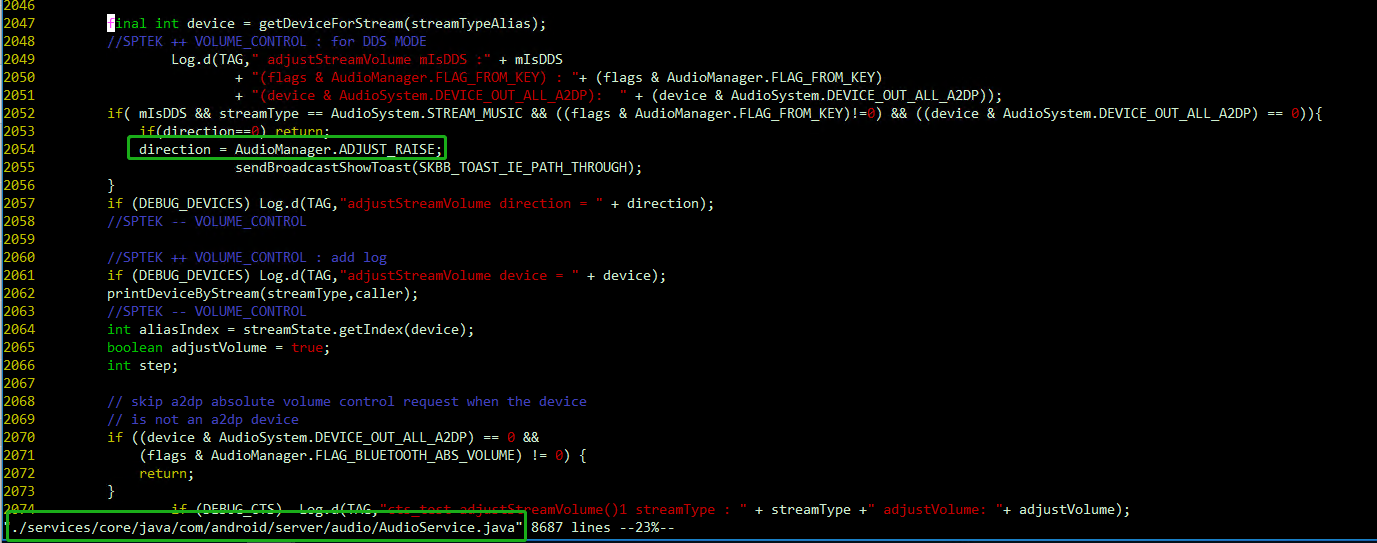
Hi YK, Please check the AudioService.png with SPTEK, it looks like the direction is always be set as ADJUSET_RAISE. so if user click volume down (STB RCU), it still send volume up cec key to TV. AudioService.png (159,432 bytes) |
|
|
Hi Jason, Thank you for report this issue. I shared this issue and your analysis to https://jira.skbroadband.com/browse/BTVD-21674 I'll let you know if any update. Thank you. |
|
|
Hi Jason, SPTEK was fix this issue by another jira ticket. The commit is below. frameworks/base Author: scpark97 <scpark97@sptek.co.kr> Date: Thu Aug 25 15:26:32 2022 +0900 [BTVBIPUW-516]BT스피커 연결후 재 부팅시 볼륨소리가 증가하는현상수정 [BTVBIPUW-515]음소거상태에서음향출력외부기기로 변경시 볼륨수정 Change-Id: I16bebf93673d4edcb309a33ae943e60e33e5cdda Please apply this commit and test again. Thank you. |
|
|
Hi JunGyu, I've verified this patch, I have one question. Test steps: 1. enable cec and passthrough 2. play Dolby Digital Content. In previous problematic build => Press volume up/down on STB RCU, we can see the TV UI volume (not STB UI), but the behavior of TV UI volume is wrong. In current build => Press volume up/down on STB RCU, we don't see the TV UI volume, so I can not confirm the behavior of TV UI volume Is this the behavior STPEK want? Thanks, Jason |
|
|
Hi Jason, SPTEK shared test patch but SPTEK's TV does not shown TV UI volume before and after apply this patch. So they could not test patch's affect. Could you please test by apply this patch? Thank you. audioservice_passthroughToTv.patch (3,118 bytes) |
|
|
Hi JunGyu, Before Applying the following patch (version 15.534.28) [BTVBIPUW-516]BT스피커 연결후 재 부팅시 볼륨소리가 증가하는현상수정 [BTVBIPUW-515]음소거상태에서음향출력외부기기로 변경시 볼륨수정 Does SPTEK reboot device after enabling Passthrough/CEC? Test Condition: (15.534.28) Pair BA01 RCU Passthrough ON CEC ON Reboot device -> Make sure CEC available. Play AC3 content You can see the TV Volume UI, but the behavior is incorrect. Can you also reproduce it on your side? Thanks, Jason |
|
|
Hi Jason, I have tested as you mentioned sequence(Reboot device after Enable CEC), TV Volume UI does not appear. And TV's volume is not changed when press RCU volume button. I tested in SAMSUNG and LG TV. Thank you. |
|
|
Hi JunGyu, Did you test it with Dolby Audio content? If you don't have PlayMovie paid content, I think you can verify it with Disney+. Thanks, Jason |
|
|
Hi Jason, I tested with Play movie (Doctor Strange in the Multiverse of Madness - Trailer) and Disney+ (Doctor Strange in the Multiverse of Madness). All contents are Dolby audio content. The result is same. TV volume UI does not appear. Thank you. |
|
|
Hi JunGyu, Hi JunGyu Please check the attachment issueWithSonyTV-20220906.mp4 At first frame: confirm the version is 15.534.28 At time 48s: Play Doctor Strange in the Multiverse of Madness => you can see the info page, it shows "5.1" icon, it's Dolby audio At time 59s: Our QA press volume up on STB RCU, you can see the TV Volume UI is increased, and the top of screen also shows the toast. At time 1min03s: Our QA press volume down on STB RCU, you can see the TV Volume UI is still increased, and the top of screen also shows the toast. issueWithSonyTV-20220906.mp4 (16,766,750 bytes) |
|
|
Hi Jason, Is issueWithSonyTV-20220906.mp4 the result after applying the patch(audioservice_passthroughToTv.patch)? Thank you. |
|
|
Hi JunGyu, No, the video clip (issueWithSonyTV-20220906.mp4) is tested with 15.534.28. Test1: 15.534.28 => The behavior is weird. Test2: 15.534.28 + following patch => The TV UI volume is gone. it looks good. but I am not sure if this is the expected result. so I ask you on comment https://mantis.cnsbg.foxconn.com/vaas/view.php?id=1526#c10754 [BTVBIPUW-516]BT스피커 연결후 재 부팅시 볼륨소리가 증가하는현상수정 [BTVBIPUW-515]음소거상태에서음향출력외부기기로 변경시 볼륨수정 Test3: 15.534.28 + following patch + audioservice_passthroughToTv.patch (not tested yet) [BTVBIPUW-516]BT스피커 연결후 재 부팅시 볼륨소리가 증가하는현상수정 [BTVBIPUW-515]음소거상태에서음향출력외부기기로 변경시 볼륨수정 If the result of test2 is the excepted result, I think we don't need to test Test3 (including audioservice_passthroughToTv.patch) Thanks, Jason |
|
|
Hi Jason, Sorry for the confusion. 1. The symptom that the TV volume UI does not appear due to the patch below is incorrect. [BTVBIPUW-516]BT스피커 연결후 재 부팅시 볼륨소리가 증가하는현상수정 [BTVBIPUW-515]음소거상태에서음향출력외부기기로 변경시 볼륨수정 2. SPTEK delivered a patch for the fix, but the symptoms are not reproduced on TVs owned by SPTEK and ALT. 3. In conclusion, please test after applying the modifications as follows. [BTVBIPUW-516]BT스피커 연결후 재 부팅시 볼륨소리가 증가하는현상수정 [BTVBIPUW-515]음소거상태에서음향출력외부기기로 변경시 볼륨수정 audioservice_passthroughToTv.patch Thank you. |
|
|
Hi JunGyu, After applying the following patches, [BTVBIPUW-516]BT스피커 연결후 재 부팅시 볼륨소리가 증가하는현상수정 [BTVBIPUW-515]음소거상태에서음향출력외부기기로 변경시 볼륨수정 audioservice_passthroughToTv.patch For PlayMovie => Looks good to me. (PlayMovie_20220912.mp4) For Disney+ => Please refer DisneyPlus_20220912.mp4. When a volume up/down button is pressed, the TV Volume UI will be increased/decreased 2 levels You can compare DisneyPlus_20220912.mp4 with PlayMovie_20220912.mp4. PlayMovie_20220912.mp4 (10,926,838 bytes) DisneyPlus_20220912.mp4 (12,567,831 bytes) |
|
|
Hi Jason, I shared that your comment to STPEK. In conclusion, the behavior is correct that TV volume UI does not appear. Because when passthrough is enabled, SKB's concept is that the volume control does not needed. And If user want to control TV's volume, user can control with RCU's right volume button. Additionally, SPTEK reviewed INTEK Smart 3 code, CEC related code does not exist. Thank you. |
|
|
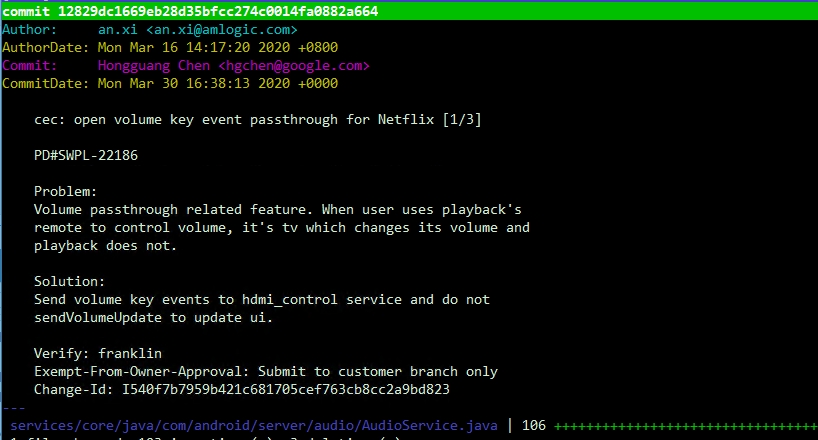
Hi JunGyu, I agree with SKB's concept. I've also checked this question with Jerry. He said this function is implemented by Amlogic for Netflix certification. (cec should work in passthrough mode) You can check the history of AudioService.java (AudioService.java.png) As you know, the Smart3 doesn't support Netflix currently. I think SPTEK can refer this patch, and make our Sony TV to meet SKB's requirement. Thanks, Jason AudioService.java.jpg (185,716 bytes) |
|
|
Hi Jason, Thanks for the check of history. I shared the history with SPTEK. When the Smart3 support Netflix, SPTEK will discuss this function with SKB. Thanks. |
|
|
no activity for this issue |
- yk.jung ( (ALTech) Younkwang Jung ) developer